From a Blank Canvas: Building My First Open-Source React Editor

Hey everyone,
I’m incredibly excited to finally share my first major open-source project: the React Content Editor.
Like many of you, I’ve spent countless hours searching for the perfect content editor for React apps. I found plenty of options, but they were often heavy, hard to customize, or didn’t feel quite right. So, I decided to build my own — from the ground up, with a focus on simplicity, performance, and a developer-first experience.
This isn’t just a component; it’s a foundation I built for myself and now want to share with the community. I’d love for you to check it out.
The Problem I Wanted to Solve
Most rich text editors are bloated with features you’ll never use. My goal was to create a lightweight, modular, and highly customizable editor that gives you exactly what you need, nothing more. It’s built with modern React 18 and a clean API, designed to be productive right away.
Curious to see it in action?
Live Demo link https://codesandbox.io/p/devbox/distracted-snowflake-kn38z5?workspaceId=ws_GPfy7MZUG3485SYHQTd1LM
Key Features for Developers
I designed this editor with you in mind. Here’s what makes it stand out:
Zero-Config, Smart Defaults: Get a beautiful, functional editor with a single line of code. No complex setup or configuration files needed.
Modular & Customizable: Only need a few buttons? No problem. The toolbar is fully configurable, allowing you to build a minimalist editor for comments or a full-featured one for articles.
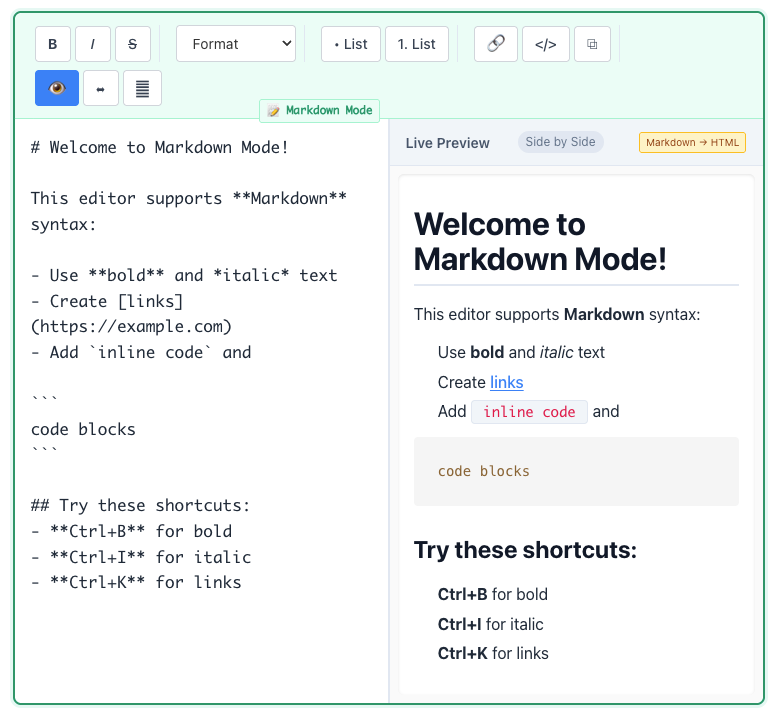
Built-in Markdown Support: For a lot of technical content, markdown is king. This editor offers bidirectional markdown support, so you can type Markdown and see a live-rendered rich text view.
Blazing Fast Performance: No unnecessary bloat. The component is optimized for smooth performance, even with large documents.
TypeScript Ready: Built with TypeScript from the start for a seamless, type-safe development experience.
Getting Started is Easy
Just a single command to install and you’re good to go.
Bash
npm install @tech-library/react-editor
Then, import the component and drop it into your app.
JavaScript
import Editor from "@tech-library/react-editor"
const App = () => {
  return (
    <Editor
      initialContent="<p>Start creating amazing content!</p>"
      placeholder="Begin your story..."
      onContentChange={(content) => console.log(content)}
    />
  )
}
Press enter or click to view image in full size
I Need Your Help!
This is my first open-source project, and it’s a huge learning experience. I’ve done my best to make it robust, but this project will only get better with the help of the community.
If you like the idea, please consider:
Giving it a star on GitHub: This helps increase visibility and shows your support.
Opening an Issue: Found a bug? Have a feature idea? Let me know!
Contributing: I would be thrilled to receive your first PR! The project is set up with a simple
npm run devin thedemofolder to make it easy to contribute.
You can find the full code and documentation on GitHub: https://github.com/anup-singh/react-editor